Apple Maps has been out for over two years, but it’s just finally completing its original mission to completely replace Google Maps in all of Apple’s products.
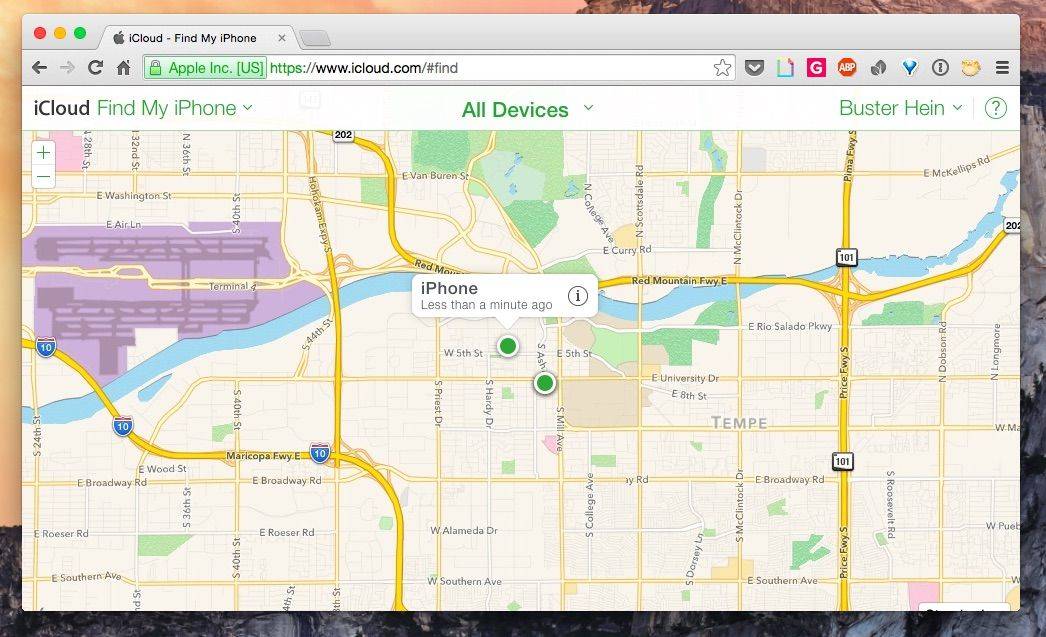
Starting today, iCloud.com users will see an online version of Apple Maps when using Find My iPhone instead of Google Maps.
Apple started its transition away from Google Maps on iCloud.com earlier this year by replacing it with Apple Maps on the iCloud.com Beta site in July. The Find My iPhone app for iOS has been using Apple Maps since Apple introduced the new service with iOS 6, but Apple has still been reliant on Google for its web services until today.
The introduction of Apple Maps in 2012 was heavily criticized by users due to the service’s horrible inaccuracies and missing information. The launch was so bad that Apple’s VP of Software, Scott Forstall, was fired after refusing to apologize for the botched launch. Apple has steadily built the platform into a solid Google Maps competitor over the last two years by gathering information from a number of sources.
Apple pulls data from TomTom and other services to help create its maps, and it uses many different design cues from Google Maps. A big update for Apple Maps was expected to come with iOS 8, but it was reportedly pulled because of internal problems.

Buster Hein is a freelance writer who lives in Phoenix, Arizona. Twitter: @bst3r.


16 responses to “With iCloud switch, Apple completes purge of Google Maps”
I hate to tell you Apple, I’m going to continue to use Google Maps. I have been caught too many times in the wrong place using your crappy software. In fact, I have moved it to my sixth page, the one with Books, Newsstand, Health, Stocks, iTunes Store, Game Center and Apple Weather.
Once a hater always a hater…lol
Why don’t you tell Apple directly by sending them some feedback. http://www.apple.com/feedback, that way it will get directly to the source.
Why stay with an iPhone? Why not simply get an Android phone? Huh?
Now that would be a big mistake! Disliking one App is not a reason to switch to an inferior platform. Go to your Cult of Android and stay away from here. As a postscript: If Coca Cola made a Map App, and it was good, I would use it over Google. I hate Google, I hate their corporate model and I particularly dislike their CEO.
This is the single biggest gripe I have with iphone. Apple Maps are terrible. My home and my business show up in the wrong spots. my home is just a block off, but my business is nearly a half mile off. I’ve notified apple countless times to no avail. So Frustrating.
Keep notifying Apple. They will update it. It is a difficult task since it is a WORLD-WIDE task. There may be millions of people ahead of you asking for corrections.
I notified them of the wrong location for our local library – it was located across the street from its actual location. A year later, the library location was corrected. Yay!
Google isn’t totally great either. It doesn’t update its maps totally every year. Some places may get an update once every 5 years. Google still lists a dead end street that was opened 10 years ago in my town, for example. That error has yet to be corrected.
Now called “Never find my iPhone.”
I wish this was a joke. Just checked Find my iPhone now and it puts me a couple clicks south of where I actually am. If I were actually looking for my iPhone right now, I’d be way off. This nullifies the usefulness of the app.
Obviously the GPS satellites are off and are giving wrong information to your iPhone.
In big cities, the tall buildings will cut off GPS signals, making locating yourself very difficult.
No, this is bologna. Triangulation is generally off by a few meters at most. Opening Apple maps and viewing my current location vs my current location on Google maps are completely different. I’m not even talking about a street or two – it’s a major difference.
Google Maps is indisputedly better and i am a huge Apple fan. Google for instance tells me exactly which lane to be on on a confusing freeway transition before making a turn; you can see individual lanes. On Apple Maps lanes are mostly just thick blobs. In a million little ways Google Maps is much easier and more accurate than Apple Maps. This is more than a question of just improving the GUI; Google really has invested tons of effort into making their map app really hum. And don’t get me started on the “infinite loops” Apple puts me into quite feequently, driving around the same block forever. I have never gotten lost with Google nav and frequently do with Apple nav. Sorry Apple, you have tons of work to do to catch up with Google.
You must be easily confused when you don’t know what lane of the Freeway to use. There are signs on the road to tell you. Simply keep your eyes on the road, not on the iPhone.
Thanks for the advice. I’ll try and remember that next time i’m in 10 lanes of merging traffic in an unfamiliar city.
Yay! No need to give Google your location data. No need to give Google any of your data to sell to advertisers or the NSA.
The only thing I use Google Maps for is street view and that isn’t often. Maybe in the midwest, things work better, but I’ve not had many problems, actually fewer problems than with Google Maps. How about this; everyone just use the maps you like?